Small habits, and one button that says “call me when you can”
My dad has a system. When he wants to talk to me, he calls. If I don’t answer, he calls again. And again. At least four times in a row. Then he decides to wait, and sends me “Call me when you can”.
He is 82 and lives in Romania. I live in Lisbon, two hours behind him. I have to admit, I’m glad his system has a last step. Four missed calls can make your heart jump, even when nothing is wrong. “Call me when you can” says the same thing in a calmer voice: I’d like to hear you. No rush.
My mom is the opposite. She knows to call me in the evening, or to wait for my call. Two parents, two styles, and the same wish underneath: to stay in touch.
If you want to stay in touch with elderly parents, especially ones who live alone or far away, this article is for you. First, a few simple habits that work for any family. Then, a small button we built for the moments in between.
The short answer
Staying in touch with an aging parent works best when it is easy, regular and free of pressure. Three things help most:
- a routine you both know, like a fixed day and hour for a longer call
- short, light contact in between, so a call is never a big event
- an easy way to say “call me when you can” that doesn’t sound like bad news
Why it gets hard to stay in touch with elderly parents
It is rarely a lack of love. Usually, it is one of these:
- Different rhythms. Work, time zones, school runs, afternoon naps. Your good moment is often their wrong one.
- “I didn’t want to disturb you.” Parents don’t call because they think we are busy. We don’t call because we don’t want to wake them.
- A ringing phone wants an answer now. If you can’t pick up, it rings again. My dad is living proof.
- Typing is hard work. “Call me when you have time, nothing urgent” is a lot to type on a small screen. The short version, “call me”, can sound like trouble.
Nobody does anything wrong here. The easiest thing is simply to wait for a better moment, and those moments add up to weeks. It matters, too: the US Centers for Disease Control and Prevention notes that older adults are more at risk of social isolation, and that isolation and loneliness affect both mental and physical health.
Small habits that keep you close
None of these needs an app. They just need a little intention.
- Keep one fixed call. Same day, same hour, every week. Sunday after lunch, for example. It gives both of you something to look forward to.
- Short and often beats long and rare. Five minutes, three times a week, keeps you closer than one long call a month.
- Ask about something specific. “How are you?” gets “Fine.” A question about the garden, a neighbor or yesterday’s chess game gets a story.
- Send something small. A photo of your lunch, the view from your walk, a drawing from a grandchild. No answer needed.
- Let them help you. Ask for a recipe, an opinion, a family memory. Feeling needed is a way of staying in touch too.
- Agree on a “no rush” signal. A word, an emoji, a button: something that means “call me when you can” without worry. That is exactly what the next part is about.
The “Call me when you can” button
If you are new here: Parents are OK is an app that quietly lets you know if your parent’s phone shows no activity for longer than usual. It uses no GPS, no camera and no microphone. It also has a few small tools for staying close, and this button is one of them.
On your parent’s phone, it is the big button on the app’s main screen. One tap, and the app answers: “Ioana will call you soon”, with your name in it. A small line, and a reassuring one.
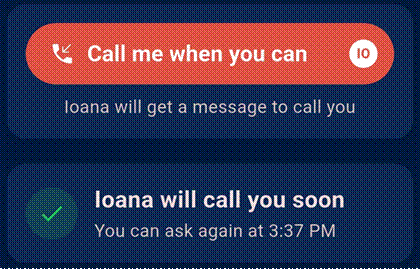
My mom’s app before and after she presses the button.
On your phone, a notification arrives: “Call request. Mami would like you to call.” It comes with your phone’s usual notification sound, or none if your phone is on silent. No alarm, no red color, nothing to decode. If you can’t call straight away, the request waits for you in the app until you mark it as done.
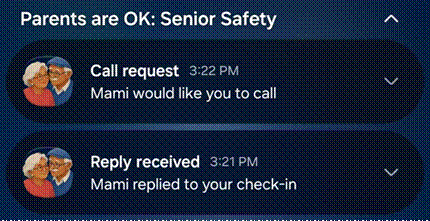
A call request on my phone, under it the reply to a check-in I sent a minute earlier.
And a built-in pause. After a request, the button rests for 15 minutes, and the app shows when your parent can ask again. Somehow, this part always makes me think of my dad and his four calls in a row.
A check-in is something different
From your side, you can send your parent a check-in. It asks “are you OK?”, and your parent answers with one tap on a big Ok button. It can ring even when their phone is on silent, so it is the tool for when you need an answer.
So the two work together: you check in when you need to know they’re OK. They ask for a call when they’d simply like to talk.
Home screen widgets: one tap, no app to open
A widget is a small tile on the phone’s home screen, next to the app icons. It makes all of this even easier, because nobody has to open the app.
- On your parent’s phone: the Call me tile sends the call request with one tap. Next to it, the status tile says “Ioana knows you’re OK”, with your name. Every time they unlock the phone, it quietly tells them that someone is thinking of them.
- On your phone: the status tile shows how each parent is doing, without opening the app, and the check-in tile sends a check-in with two taps.

My mom’s screen: the “Call me when you can” tile
The tiles work on iPhone and Android. Adding them takes about a minute, and the step-by-step guide is in the app.
How to introduce the button to your parent
A button only helps if it feels safe to press. A few minutes together make the difference.
- Set it up during a visit. The two phones have to be paired in person anyway. Put the Call me tile on their home screen while you’re there.
- Say what it means. “When you press this, I know you’d like to talk. Nothing is wrong. I’ll call as soon as I can.”
- Say what it doesn’t mean. If something is urgent, they should call you directly, or the emergency number.
- Try it together once. Let them press it, and show them what arrives on your phone.
- Always call back. The first few times matter most. If the button always brings a call, they will trust it.
What the button can’t do
- It is not an emergency button. For anything urgent, call directly. In an emergency, call the emergency number.
- It doesn’t replace the call. It only makes the call easier to start.
- It needs an internet connection. If the phone is offline, the tile tells your parent it couldn’t send and asks them to try again.
- It is never homework for your parent. The inactivity alert, the sleep hours and the phone drop alerts all work in the background. The button is simply there for the days when someone would like to talk.
Frequently asked questions
- Is “Call me when you can” an SOS button?
No. It is a calm request for a call. For anything urgent, call directly or use the emergency number.
- Does my parent need to open the app?
No. With the Call me tile on their home screen, one tap is enough.
- What if my parent has more than one child using the app?
They choose who the button asks: one of you, or everyone.
- Can my parent send lots of requests in a row?
No. After each request there is a 15-minute pause.
- Does the app show my parent’s location?
No. Parents are OK doesn’t use GPS, the camera or the microphone.
A last thought
I keep thinking about how much love hides in “I didn’t want to bother you”. Parents say it to protect our time. We say it to protect their rest. And between two people being considerate, a week can pass without a real conversation.
To stay in touch with elderly parents, we don’t always need more calls. Sometimes we just need an easier way to say “I’m thinking of you, call me when you can”, and to let the other person choose the moment. Even my dad, after four tries, gets there.
So, my question for you: is your parent more like my dad, who calls four times, or my mom, who waits for the evening? And what would change if asking for a call took just one tap?
Talk soon,
Ioana
Related Parents are OK guides
- Inactivity Alert App for Elderly Parents: How It Works
- Sleep Hours: Let Your Parent Rest Without Inactivity Alerts
- Phone Drop Alerts for Elderly Parents

My guiding question every day is: ”How can I make this better?” I have a creative mind, an eye for all things beautiful, and a drive to bring people together. With a background in non-formal education, psychology, entrepreneurship, and interior design, I believe there is always a new opportunity around the corner. Life is interesting. Enjoy and make the most of it!