My dad is 82. He lives in Romania, and we live in Lisbon, Portugal. We visit him several times a year, and so does my brother.
Dad hasn’t slept through a whole night in years. He sleeps a few hours during the day and a few hours at night, but never a full night in one go. He doesn’t watch much TV, yet in the evening he often falls asleep in front of a movie, “just resting his eyes”. Then, somewhere around 3 AM, he’s up again: he puts on some music on YouTube and starts an online chess game, on his tablet or his phone, against someone who apparently doesn’t sleep either.
So when we set up Parents are OK for him, one setting made me stop and think. Sleep hours. When, exactly, does a man like my dad sleep? And what should an app count as a quiet night for someone whose nights look nothing like the textbook?
This article is about that setting: what it does, how it works, and how to choose a sleep window that fits the parent you actually have.
What are sleep hours?
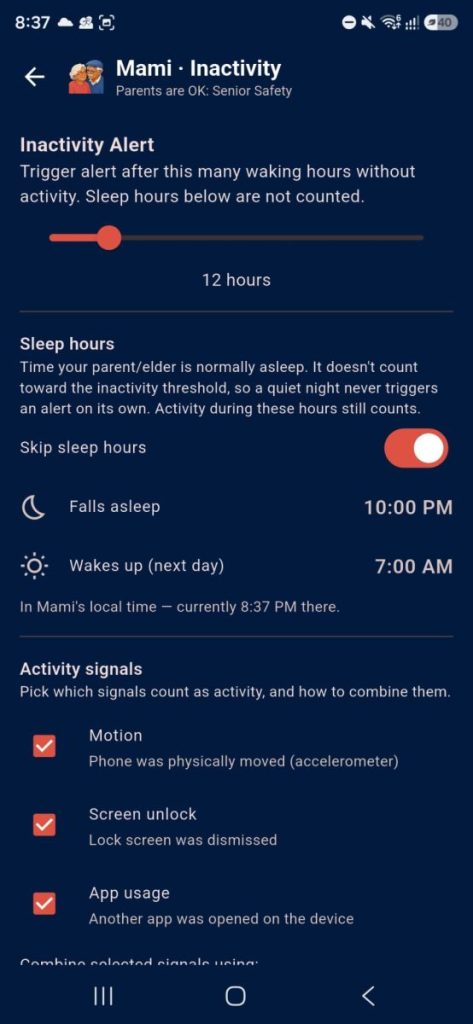
Sleep hours are a quiet window you set for each parent, for example from 10 PM to 7 AM. Time inside that window doesn’t count toward the inactivity limit, so a long, peaceful night never sets off an inactivity alert. If your parent goes to the bathroom during the night and picks up their phone to check the time, that activity is recorded, but it doesn’t restart the count. That’s the short version.
Why a good night’s sleep can look like silence
The inactivity alert works by noticing ordinary signs of life on your parent’s phone: the screen being unlocked, an app being opened, the phone being moved. During the day, those signs come naturally. At night, they stop, and that’s exactly how it should be.
Sleep is the longest predictable quiet stretch in anyone’s day. According to the U.S. National Institute on Aging, older adults need about the same amount of sleep as younger adults, roughly seven to nine hours a night. What tends to change with age is how that sleep arrives: it becomes lighter, it’s broken up by more awakenings, and it often shifts earlier, with earlier bedtimes and earlier mornings.
Add a few everyday habits, like a phone left charging in the kitchen, a slow Sunday morning or an afternoon nap, and you can see the problem. Without sleep hours, an app would have to count all of that quiet time against your parent. You’d have two uncomfortable choices:
- set a very long limit to cover the night, and hear about a real problem later than you’d like, or
- keep a shorter limit, and risk an alert that only means Mom slept well.
Sleep hours remove that dilemma. The night is set aside, and the limit only has to cover the hours your parent is awake.
How sleep hours work in Parents are OK
You set sleep hours in the settings of the Guardian app, separately for each parent you look after.
- Switch “Skip sleep hours” on and choose a start and an end time. For example, 10:00 PM to 7:00 AM.
- The window follows your parent’s local time. If you live in another country, there’s no time-zone arithmetic to do.
- The inactivity limit counts waking hours only. By default, an alert arrives after 12 waking hours without activity. Hours inside the sleep window are left out of the count.
- Activity at night is noted, but it doesn’t restart the count. If your parent gets up at 3 AM and checks the clock, you may see it in the log, but the inactivity count only resumes when sleep hours end.
- Your parent doesn’t have to do anything. Nothing changes on their phone, and there’s nothing for them to remember to do.
A simple example
Let’s say Mom’s sleep hours are 10 PM to 7 AM, and her inactivity limit is 12 waking hours.
She puts her phone down at 9:00 PM, after a call with you. From 9 to 10 PM, one waking hour passes. Then the sleep window begins, and the count pauses for the night. At 7:00 AM it picks up again. If her phone stayed completely untouched the next day, the alert would arrive at around 6:00 PM, after 12 waking hours of silence: 1 hour the previous evening plus 11 hours during the day.
In real life, of course, she’ll pick up her phone long before that: to read the news, answer a message, make a call, or check whether it’s going to rain.
The count simply pauses for the night and picks up again in the morning. It doesn’t start again from zero.
How to choose the right sleep window
Here’s my honest advice: set the window around the sleep your parent actually gets, not the bedtime you wish they had. For my mom, 10 PM to 7 AM works just fine; she always sleeps well. But for Dad, something like 11 PM to 4 AM works better.
A short conversation helps more than any guess. Ask them:
- “What time do you usually go to bed? And when do you really fall asleep?”
- “When do you wake up, and when do you first look at your phone?”
- “Where does your phone spend the night?”
- “Do you sleep more on weekends?”
- “Do you ever get up in the night and stay up for a while?”
Then keep the trade-off in mind:
| Narrower sleep window (about 3–6 hours) | Wider sleep window (about 6–9 hours) | |
|---|---|---|
| If something is wrong, you hear about it | Sooner | Later |
| Chance of an unnecessary alert on an ordinary day | A little higher | Lower |
| Suits a parent who | Sleeps in short stretches, or reaches for the phone soon after waking | Sleeps in, or doesn’t touch the phone until after breakfast |
A good starting point is their usual bedtime to the time they normally first use their phone, with a small cushion at each end, say half an hour. Watch how the first couple of weeks go, then adjust. If an alert ever arrives after a perfectly ordinary night, the window is probably too narrow, or the limit too short, for their rhythm. It’s a bit of fine-tuning, and you usually only need to do it once.
When sleep doesn’t keep to the clock
Back to my dad. For him, a classic 10-to-7 window would have been a strange fit. He’s often awake and on his phone or tablet right in the middle of it, and he only ever sleeps a few hours at a time.
So we did something that surprised me at first: we made his window narrower, not wider. His sleep hours run from 11 PM to 4 AM. Here’s why that works for him:
- His daytime sleep comes in short pieces. A few hours during the day barely touch a 12-waking-hour limit, so they don’t need a window of their own.
- His phone keeps him company. Music on YouTube, chess. When he’s using it, the app notices almost straight away.
- His tablet doesn’t count. The app only sees activity on the phone it’s installed on. When Dad settles into a long chess game on his tablet, his phone may sit quietly beside him, and that’s worth keeping in mind when choosing his limit. If your parent loves using a tablet too, or watching TV, think about how often the phone itself gets picked up.
- A narrow window keeps the app attentive. For a man who is usually up around three, a silent night that stretched into late morning would be unusual. If that ever happened, I’d want to know sooner rather than later.
If your parent’s sleep is irregular too, the same thinking applies: cover their longest, most predictable stretch of sleep, and let the inactivity limit take care of the rest. That’s also how the app is built: each parent has one sleep window, so it’s worth choosing the stretch that matters most.
One more thing, said gently. Sleep naturally changes as we age, but the National Institute on Aging advises talking to a doctor if someone feels tired and unable to function well for more than a few weeks. If setting up sleep hours shows you that your parent’s nights have changed a lot, that’s a conversation worth having with them, and with their doctor. It’s not one an app can have for you.
What sleep hours don’t do
I’d rather you trust this feature for the right reasons, so here are its limits:
- Sleep hours don’t track sleep. The app doesn’t know whether your parent is asleep.
- They don’t monitor health. Parents are OK doesn’t detect illness, breathing problems or falls during the night.
- They don’t cover your own night. Your parent’s sleep hours are about their rest. For yours, the Guardian app has separate quiet hours: alerts that come up while you sleep are held back, then sent the moment your quiet hours end. That means a calmer night for you, but also that you’d hear about a long silence in the morning rather than at 3 AM, so choose your own quiet hours with that in mind.
- They’re not an emergency service. If you’re worried, call your parent, a neighbor, or local emergency services.
Frequently asked questions
Will my parent’s sleep set off an inactivity alert? Not if you set their sleep hours. Time inside the sleep window doesn’t count toward the inactivity limit.
What happens if my parent uses the phone during sleep hours? It’s recorded, so you may see it in the activity log, but it doesn’t affect the count. The inactivity count only resumes when sleep hours end.
Can I set different sleep hours for each parent? Yes. Sleep hours are set separately for each parent, so Mom’s early nights and Dad’s late chess games can each have their own window.
Does using a tablet count as activity? No. Parents are OK only notices activity on the phone where the Senior app is installed. Watching TV, playing on a tablet, gardening or a walk without the phone are simply part of a normal day, so choose a limit that leaves room for your parent’s routine.
My parent lives in a different time zone. Which time does the window use? Your parent’s local time. You set 10 PM to 7 AM, and it means 10 PM to 7 AM where they are.
Does my parent need to do anything? No. Sleep hours are set from the Guardian app, and nothing changes for your parent.
What about afternoon naps? Each parent has one sleep window, so use it for their longest stretch of sleep, usually the night. Short naps are covered by the inactivity limit itself.
Will an alert wake me up in the middle of the night? Only if you want it to. As a guardian, you can set your own quiet hours. Alerts that come up during them aren’t sent straight away; they arrive as soon as your quiet hours end.
Does Parents are OK track my parent’s sleep? No. There’s no sleep tracking, no GPS, no camera and no microphone. The app only notices whether the phone is being used.
Try it with your own parent
If you’d like a quieter way to know your parent’s day has started, try Parents are OK free. Install the Guardian app on your phone and the Senior app on your parent’s, link them with a code, then set their sleep hours and a limit that fits their routine. Your free trial starts only when you connect your first parent, so none of it is spent on setup.
Download the appRead the first article in this series: Inactivity Alert App for Elderly Parents: How It Works
The hours that belong to them
While writing this, I realized that sleep hours are less about technology and more about respect. Setting them is the moment we tell the app, and ourselves: these hours belong to them. No questions asked, no check-ins, no worrying.
My dad will probably never sleep like a textbook. He’ll keep his 3-4 AM chess games and his songs in the dark, and I’ve stopped wishing he’d sleep “properly”. The window we chose isn’t the night I imagined for him. It’s the night he actually has. And somehow, accepting that made me worry less, not more.
So here’s my question for you: do you know when your parent’s day really begins? Not the time you’d guess, but the time they’d tell you if you asked them. And do their sleep hours change with the seasons: do they fall asleep earlier in winter?
Talk soon,
Ioana

My guiding question every day is: ”How can I make this better?” I have a creative mind, an eye for all things beautiful, and a drive to bring people together. With a background in non-formal education, psychology, entrepreneurship, and interior design, I believe there is always a new opportunity around the corner. Life is interesting. Enjoy and make the most of it!