How They Work, and How to Set Them for Each Parent
Not long ago, my phone showed me an alert I had never seen before: Dad’s phone had been dropped. Did my dad fall? Or did he just drop his phone by mistake?
For a second, my stomach dropped with it. Dad is 82 and lives in Romania. I live in Lisbon. Between us there are a few countries and no quick way to knock on his door.
Then I saw new activity on his phone, and that calmed me down enough to call him. He told me the whole story, laughing. He had been walking up the stairs inside the house, a cup of coffee in one hand and the railing in the other. One flip-flop caught on a step, and down he went. The railing saved him, and he wasn’t hurt. The coffee wasn’t so lucky.
I laughed with him, worried but relieved. Later that evening I kept thinking about it. Dad’s balance isn’t what it used to be. He loves his flip-flops, even on the stairs. A fall like this is rare for him, but rare doesn’t mean never.
And under all of it sat the question every adult child living far from a parent knows by heart: what if he falls, can’t get up, and nobody knows for hours?
That question is why Parents are OK has phone drop detection. Here’s how it works, how I set it up differently for each of my parents, and which phone settings help the alert reach you.
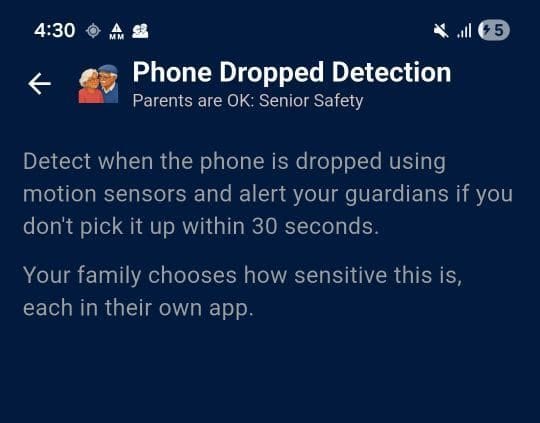
How phone drop detection works
When your parent’s phone takes a hard drop, Parents are OK notices and can send you an alert. Here’s what happens, step by step:
- The phone drops. If the drop is hard enough for the sensitivity level you chose, the app registers it.
- The app waits 30 seconds. If your parent picks the phone up in that time, no alert is sent. The app treats it as an everyday slip: the phone slid off the table, they picked it up, life goes on.
- If nobody picks it up, you get an alert. The time in the alert is the time of the drop, not the time the alert reached you. That matters, because you know exactly when it happened.
- The alert can close on its own. With “Resolve when the phone moves” switched on, the alert is marked as resolved when the phone detects movement or steps afterwards. If your parent uses the phone, the alert is always resolved. To notice steps, the app reads the phone’s step count, from its built-in step counter or from a health app such as Samsung Health. It doesn’t use GPS or track your parent’s location.
That’s exactly what happened with Dad. His phone was in his pocket, so it felt the fall without flying down the stairs. Dad didn’t reach for it straight away. He looked around, checked that nothing hurt, got up, picked up the cup and put his flip-flop back on properly. Only then did he take out his phone, to snap a picture of the spilled coffee. By the time he took the picture, the 30 seconds had long passed, so the alert went out. A moment later his activity showed up, and that told me the rest: he was up, he was using his phone, he was OK.
Why the picture? Dad likes to make fun of life’s small accidents. I remember the time my son spilled a cup of cocoa on our cream-colored carpet. All I could do was bring some paper towels and make family hand prints, turning it into a fun, fixable mishap. Thanks, Dad!
For now, phone drop detection works only on Android phones. Both my parents use Android, so for us it was simply a matter of turning it on.
One family, two very different settings
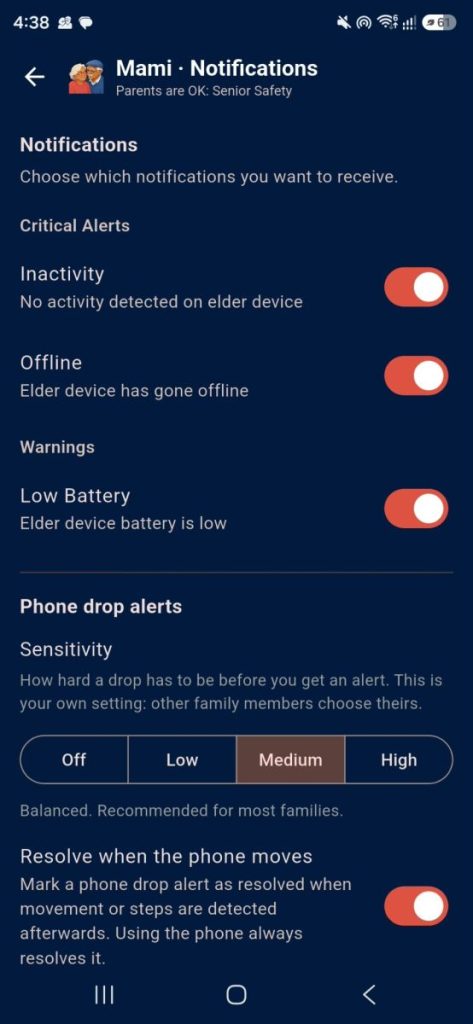
The sensitivity setting decides how hard a drop has to be before you get an alert. You’ll find it on each parent’s Notifications page, next to the inactivity, offline and low battery alerts. There are four options, and the app describes each one plainly:
- Off: you won’t be notified when their phone is dropped. Other family members still get their own alerts.
- Low: only hard drops. Fewer false alerts, but a softer drop may be missed.
- Medium: balanced, and recommended for most families.
- High: catches softer drops, but bumps or rough handling may also alert you.
You choose a level for each parent. If your siblings follow the same parent, they choose their own, so one of you can be on High while another stays on Medium.
My parents taught me why one setting doesn’t fit everyone.
Dad gently tosses his phone onto the bed. It’s a habit, and a harmless one. On a more sensitive setting, though, it could trigger alerts that really just mean Dad’s phone landed on the bed. So Dad is on Low. Everyday tosses stay quiet, and a real drop, like the one on the stairs, still reaches me.
Mom is the opposite. She watches her steps closely and always holds the railing. She’ll happily tell anyone who listens that she crossed mountains on foot when she was young, that she was an athlete, and that she still has strong legs. Her phone almost never hits the floor. So Mom is on Medium, the balanced setting. She rarely drops her phone, so false alerts are rare too. And with Mom, a hard drop would be so out of character that I’d want to know about it.
If you’re not sure where to start, a simple way to choose:
- Start with Medium and watch the alerts for a week or two.
- Getting alerts that turn out to be a tossed phone? Move one step lower.
- Is your parent careful with the phone, but their balance worries you? A step higher may suit them better.
One honest note: the phone can only notice your parent’s fall if it falls with them. When Dad slipped, his phone was in his pocket. If it had been sitting on the kitchen table, there would have been nothing to detect. So it’s worth a gentle conversation about where the phone stays during the day: a pocket is better than the kitchen table.
That’s where inactivity alerts come in: if the phone goes untouched for longer than usual, you’ll still hear about it.
Phone settings that help the alert reach you
We try to send every alert as fast as possible. Sometimes, though, the app runs into Android’s own rules about apps working in the background and syncing data. Many phone makers add stricter battery-saving rules on top, and those can pause or close apps that aren’t on screen. Samsung, Xiaomi, Huawei and OnePlus are known for this.
The good news: a few settings on your parent’s phone make a real difference. Since you set the app up in person anyway, do it then. Menu names vary by brand and by Android version, so treat these as signposts, not exact paths.
- Remove battery restrictions for Parents are OK. Open Settings → Apps → Parents are OK → Battery and choose Unrestricted (on some phones it’s called Don’t optimize).
- Samsung: keep the app awake. In Settings → Battery and device care → Battery → Background usage limits, add Parents are OK to Never sleeping apps. Make sure it isn’t on the Sleeping or Deep sleeping lists.
- Xiaomi, Redmi and Poco: turn on Autostart. In Settings → Apps → Manage apps → Parents are OK, switch on Autostart and set the battery saver to No restrictions.
- Huawei and Honor: manage the app manually. In Settings → Battery → App launch, switch Parents are OK to manual management and allow it to run in the background.
- Allow what the app asks for. The app guides you through each permission during setup, including the battery exemption above. Some steps send you to your phone’s full list of apps, where you have to find Parents are OK yourself. That’s easy for us and confusing for many parents, which is one more reason to set it up together, in person. Allow notifications, and allow access to physical activity so the app can read the step count.
- Keep the phone online. Mobile data or Wi-Fi should be on, with background data allowed for the app.
- Skip “cleaner” apps. Phone cleaners and task killers close background apps, and Parents are OK would be one of them.
If your parent’s phone isn’t on the list above, dontkillmyapp.com has step-by-step guides for each brand.
What phone drop detection can’t do
I’d rather you trust this feature for what it really does than expect something it can’t do.
- It isn’t a medical device, and it doesn’t replace one. If your parent needs medical-grade fall detection, talk to their doctor about a dedicated device. Parents are OK can sit alongside it.
- It notices the phone, not the person. A phone that falls isn’t always a person who falls, and a person who falls doesn’t always drop their phone.
- Timing can vary. Android’s background and data-sync rules can sometimes delay an alert. The settings above help a lot, but no app can switch those rules off completely.
Frequently asked questions
- Is phone drop detection the same as fall detection? Not quite. It detects a hard drop of the phone. If the phone is on your parent when they fall, a drop often means a fall, but not always. That’s why the 30-second wait and the movement check are there.
- Does phone drop detection work on iPhone? Not yet. For now it’s available on Android only.
- Will I get an alert every time my parent drops the phone? No. If they pick it up within 30 seconds, no alert is sent. And you can lower the sensitivity if everyday tosses still trigger alerts.
- What time does the alert show? The time of the drop itself, not the time the alert reached you.
- Does drop detection work while my parent is asleep? Yes. Drop detection keeps working during your parent’s sleep hours.
- What if the drop happens during my own quiet hours? The app still registers it. All alerts are held while your quiet hours are on, and the drop alert reaches you as soon as they end. If that worries you, keep your quiet hours short.
A last thought
When I think back to Dad on those stairs, what stays with me isn’t the fall. It’s the next few minutes, and the alert that turned “I have no idea” into “I know now, and he’s OK.”
That old fear, what if he falls and nobody knows for hours, hasn’t disappeared. Distance doesn’t let it disappear. But the “nobody knows” part has become smaller. I know my parents better now too. Dad tosses, Mom holds the railing, and each of them gets a setting that fits them.
So here’s my question for you: is your parent more like my dad or my mom? And where does their phone spend the day: always with them in a pocket, or on the kitchen table?
Take care, talk soon!
Ioana

My guiding question every day is: ”How can I make this better?” I have a creative mind, an eye for all things beautiful, and a drive to bring people together. With a background in non-formal education, psychology, entrepreneurship, and interior design, I believe there is always a new opportunity around the corner. Life is interesting. Enjoy and make the most of it!